Home › Clear cache on Mac
How to clear cache on Mac without losing anything
Cache files are temporary data apps rebuild, so you can delete them, but not every folder named Caches is fair game. This guide shows how to clear the cache in Safari, Chrome and individual apps in ~/Library/Caches, what to leave alone, and how Tidymint pre-selects only the safe part.
What cache is, and is it safe to clear
Cache is what apps keep so they open faster next time: web page images, previews, downloaded data. Apple's documentation says the Caches folder holds data that can be regenerated as needed, and that apps should never rely on cache files existing. macOS may also clear it on its own when the disk runs low.
So clearing cache doesn't delete your documents. The trade-off: the first launch after clearing may be a little slower while the app rebuilds it. Clearing cache gets space back and can fix an app that misbehaves; it is not a lasting speed-up.
Clear your browser cache
Safari:
- Open Safari, choose Safari › Settings and go to Advanced.
- Turn on Show features for web developers. A Develop menu appears in the menu bar.
- Choose Develop › Empty Caches. Apple says it empties the network cache and other Safari caches.
Chrome:
- Open Chrome, click the three dots at the top right and choose Delete browsing data.
- Pick a time range, for example All time.
- Tick only Cached images and files, then click Delete data.
Tick Cookies too and you'll be signed out of many sites. If you only want space back, leave cookies unticked.
Clear an app's cache by hand
- Quit the app (Cmd+Q). Clearing the cache of a running app can make it misbehave.
- In Finder choose Go › Go to Folder (Shift+Cmd+G) and type
~/Library/Caches. - Find the folder named after the app or its ID, for example
com.spotify.client. Right-click › Get Info to see its size. - Drag that one folder to the Trash. Open the app to check it works, then empty the Trash.
Some apps keep cache in ~/Library/Application Support instead, in subfolders named Cache, Code Cache or GPUCache (Chrome, Slack, Notion, VS Code). Remove only those subfolders, never the app's whole folder.
What to leave alone
| Don't delete | Why |
|---|---|
The whole ~/Library/Caches or Library folder | Apple says it is never a good idea to delete the standard subfolders of Library; the system expects them |
com.apple.… folders | macOS's own caches; the system manages them |
/Library/Caches, /System | Shared by the whole Mac; a wrong delete can break things |
AI models in Caches (huggingface, llama.cpp) | Called cache but several GB each; delete them and you download again from scratch |
Application Support (except the Cache subfolders above) | This is app data: messages, settings, libraries |
Faster: let Tidymint pick
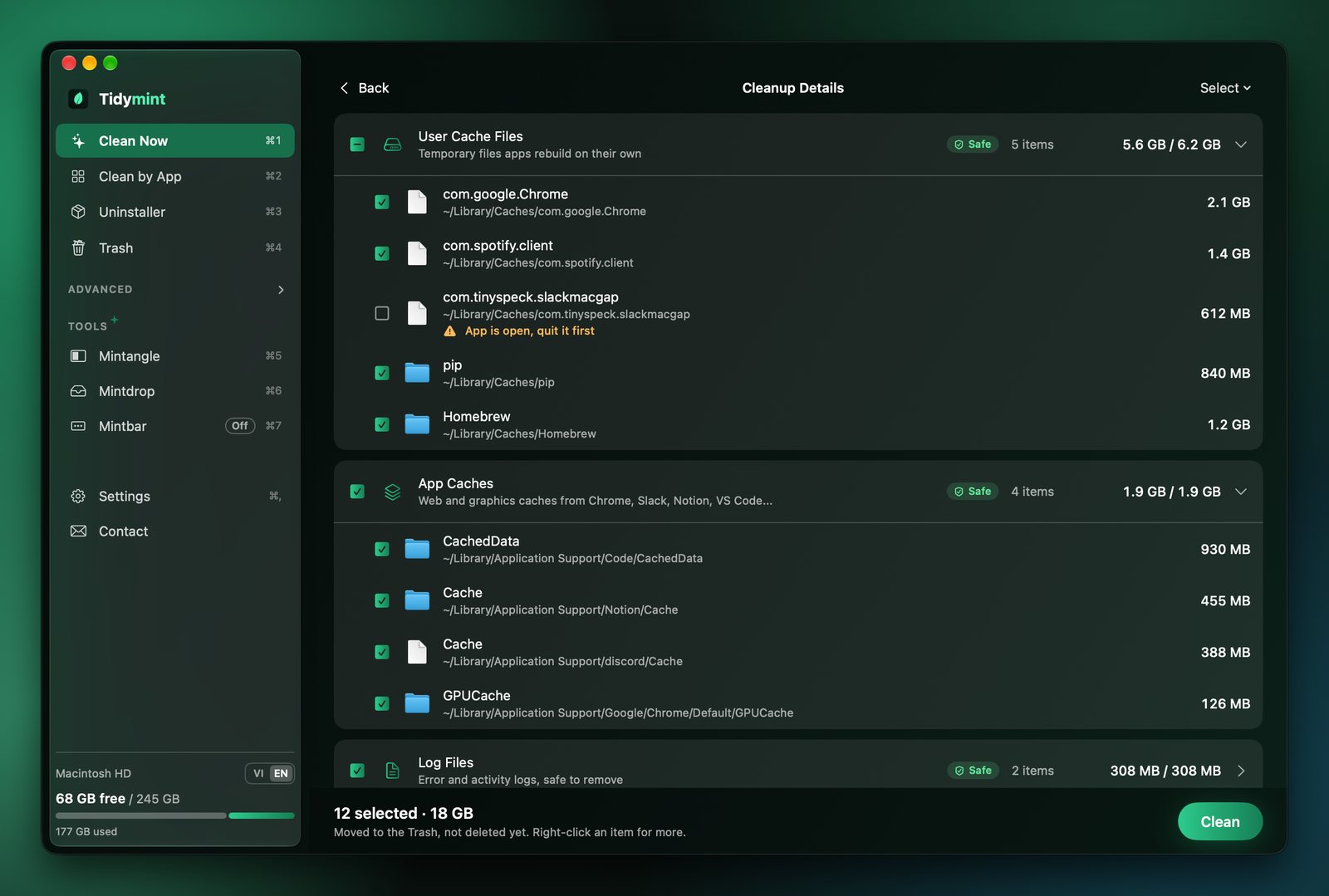
- Tidymint (free to clean, open-source core): open Clean Now and user caches and app caches (Chrome, Slack, Notion, VS Code) are listed app by app with their size. Apps that are open are not pre-selected. Apple's own caches (
com.apple.…) are never listed, and AI models are kept out of the cache list. Everything goes to the Trash first, and Undo puts a wrong clean back. - To clean one app (Telegram, Chrome) without touching its chats, use Clean by App.
Doing it by hand vs. Tidymint
| By hand | Tidymint | |
|---|---|---|
| Speed | Open hidden folders one by one, type Terminal commands | One scan, results grouped by size |
| The big picture | You see one folder at a time | Space Lens shows the whole drive and the heaviest folders |
| Understanding your Mac | Cryptic folder names like Caches and DerivedData | Plain-language notes for common folders |
| No accidental deletes | A wrong delete is gone for good | Safe items pre-selected, the rest left to you, always to the Trash first, with Undo |
| Cost | Free, but it takes time | Free to clean, open-source core |

Clean your Mac for free
Free to clean, with an open-source core. Everything always goes to the Trash first, so you stay in control.
FAQ
Does clearing cache make a Mac faster?
Usually not for long. Cache helps apps open faster, so right after clearing an app can be a little slower until it rebuilds. Clearing helps when you need space back or an app misbehaves.
Will I lose passwords or logins?
Not if you clear only the cache. Website logins live in cookies: in Chrome, leave Cookies unticked.
How often should I clear cache?
There is no need for a schedule. Caches rebuild, and macOS clears them when the disk runs low. Clear them when your disk is full or an app acts up.
Can I get cleared files back?
If you dragged them to the Trash, yes, until you empty it. Tidymint also moves everything to the Trash and has Undo.


Sources
- Apple Developer: macOS Library directory details (Caches)
- Apple Developer: The Library Directory
- Apple Developer: File System Basics
- Apple Developer: Enabling features for web developers in Safari
- Apple: Safari Develop menu (Empty Caches)
- Google: Clear cache and cookies
